One of the major issues in rolling product development is ensuring that you can reproduce a client version of software at the office. With a mature source control system such as Team Foundation this is not too much of an issue with code - at worst you go back through the changesets until you find the one that matches. But what about the database that this code relies on? How best to ensure that you have the same ER structure as the version of code? There are many methods, most of which are very hard to enforce (though I hope that the "Database" version of Visual Studio Team may sort this out).
Enter Team Foundation Policies. If you've not looked at this cool feature you should. TF ships with many cool policies - including; "must associate check in with work items", "must pass the following code tests" (using the testing features of VS Developer), "must pass a list of best practice polices", and the invaluable "must build before checkin".
That's not the extent of the power of policies. You can write your own - effectively you can do any action you want on checkin. If made use of this to force a copy of the entire database script to be placed on disk as check in occurs. All it takes is a little bit of .net code, a registry entry or two and use of a handy scripting tool.
More information on the creation of policies can be found at
http://blogs.vertigosoftware.com/teamsystem/archive/2006/02/27/2302.aspxStep 1 - Scripting the database
There is a handy tool shipped with SQL 2000, which sadly absent in SQL 2005 called "scptxfr.exe". It lies in the MSSQL\Upgrade folder under the normal program files root. This tool can quite easily script an entire database, a feature that seems harder to find in SQL 2005. I'm sure you can probably achieve the same affect with SMO, but fortunately the scptxfr tool works across both versions. Using the command like:
scptxfr /s DatabaseServer /d DatabaseName /P SAPassword /f file:////tfs-01/TFSSQLSynchRoot/$TeamProject$/$ChangeSet$.sqlwill fire the whole thing out to disk, saved for posterity. You'll notice that my file path includes $ signs. That isn't actually a valid file path, but markers that I replace in the code shown below.
Step 2 - Write your own policy
Create a new library dll , and include
Microsoft.TeamFoundation.Client and
Microsoft.TeamFoundation.VersionControl.Clientas references to the project
create a new class, inheriting from
Microsoft.TeamFoundation.VersionControl.Client.PolicyBaseMost of the methods feedback information used to describe in the visual studio GUI the name and purpose of the policy, the error messages to be returned etc. The crux of the class is the
Evaluate() method. My code works by launching another exe, by making use of
System.Diagnostics.Process
public override PolicyFailure[] Evaluate()
{
int iLastChangeSet = PendingCheckin.PendingChanges.Workspace.VersionControlServer.GetLatestChangesetId();
System.Diagnostics.Process process1 = new System.Diagnostics.Process();
process1.EnableRaisingEvents = false;
process1.StartInfo.WindowStyle = System.Diagnostics.ProcessWindowStyle.Hidden;
process1.StartInfo.FileName = "CMD.exe";
StreamReader oReader = null;
try
{
oReader = new StreamReader(File.Open(@"C:\Program Files\TFS Extended Policies\sqlsynchconfiguration.txt", FileMode.Open));
string sTeamProject = this.PendingCheckin.PendingChanges.AffectedTeamProjectPaths[0].Replace("$/", "");
string sConfig = oReader.ReadLine().Replace("$ChangeSet$", (iLastChangeSet + 1).ToString()).Replace("$TeamProject$",sTeamProject);
MessageBox.Show("Synchronising SQL DB changes using:" + Environment.NewLine + sConfig + "" + Environment.NewLine + "last change set: " + iLastChangeSet + Environment.NewLine + sTeamProject);
oReader.Close();
process1.StartInfo.Arguments = sConfig;
process1.Start();
//process1.WaitForExit();
//process1.Close();
}
catch(Exception err)
{
MessageBox.Show("SQL Synchronisation failed. Check that the configured scripting command exists, and that you have permission to access to the file shares." + Environment.NewLine + err.Message);
}
if (false)
{
return new PolicyFailure[]
{
new PolicyFailure("Please provide sql details", this),
};
}
else
{
return new PolicyFailure[0];
}
}
Note that you could wait for the scptfxr exe to complete by uncommenting
//process1.WaitForExit();
//process1.Close();but as this operation could delay the checkin by a reasonable amount of time I elected not to. Build your assembly and all your coding is done!
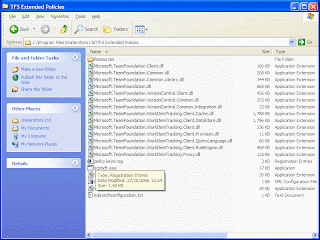
To get this all working on all users machines I found that I needed the new assembly, scptfxr.exe and several of its required dlls in the same folder. The bute force approach...but if you include all the files below it should work with least hassle
Step 3 - Add your policy to a Team Foundation Projct
In order to add your policy to the available list each machine that runs the policy will need to add registry settings
Windows Registry Editor Version 5.00[HKEY_LOCAL_MACHINE\SOFTWARE\Microsoft\VisualStudio\8.0\TeamFoundation\SourceControl\Checkin Policies]"SQLDatabaseSynchPolicy"="c:\\test\\SqlSynchPolicy.dll"
Then, in team explorer, go to
My Project -> Source Control -> Check-in Policy
and add the new policy from the available list. Note that the name of the policy will depend on the Type property you completed in your class.
Your policy is now among those enforced!

